More space. Nothing broken.
Temporary files, app logs, old installers, leftovers from deleted apps: see what each one weighs and tick what goes.

CleanMochi spots what's clogging your Mac and tells you what to do in one sentence. You make the call.
For macOS 14 or later. Coming very soon.


Cleanup, apps, startup, large files: Mochi goes through it all at once and shows you the one fix that matters most.

5894
A demo Mac, before and after following Mochi's advice. Your results will depend on your Mac.
Temporary files, app logs, old installers, leftovers from deleted apps: see what each one weighs and tick what goes.
CleanMochi finds the settings and hidden files an app leaves behind and moves it all to the Trash, so you can still get it back.

Turn off what launches on its own, and let Mochi warn you from the menu bar when memory runs low.

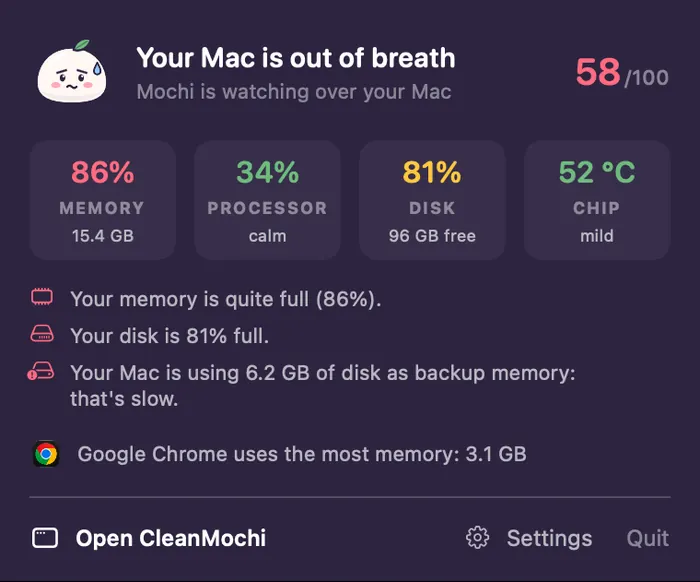
Mochi's face changes with your Mac's health. One look is enough.
 HappyWorried
 Sleepy
 Proud
ProudCleanMochi never deletes anything until you confirm. Uninstalled apps, app leftovers, duplicates and large files go to the Trash, and the Log can put them back as long as the Trash hasn't been emptied. Temporary files and app logs are deleted for good, and so is whatever you clear by emptying the Trash. Apps rebuild their temporary files on their own, and apps that are open are left alone.
None. The whole scan runs on your Mac. The app doesn't send your files or your list of apps, and it contains no analytics.
Very soon. We're waiting on Apple's signature, which lets your Mac open the app without a warning. Email [email protected] and we'll let you know on launch day.
Another question? Email us